Table of Contents
HMI for conveyor systems is more than a touchscreen; HMI for conveyor systems is the real-time nerve center that keeps your people informed, your equipment protected, and your throughput predictable.
Why HMI Design Deserves a Seat at the Big Table
In busy DCs, seconds matter. Operators need to see where product is, what’s blocked, what’s starved, and how to clear faults safely. Lafayette Engineering’s HMI approach emphasizes clear states, standardized navigation, and guided recovery—to collapse MTTR and prevent small hiccups from becoming line-wide disruptions. LaFayette Engineering+1
Principles That Separate Good From Great
- Clarity over decoration: Low-saturation color palettes, limited alarm colors (red = critical, amber = warning), and consistent iconography reduce cognitive load. ISA-101 codifies these practices and is the north star for industrial HMIs. isa.org+2Rockwell Automation+2
- Consistent navigation: Global header/footer, breadcrumb trails, and map-to-zone tap targets get techs to the right screen in one or two touches.
- Contextual diagnostics: Show the photo-eye state, last barcode read, downstream queue, and motor starter/VFD status on the same screen where a jam is reported.
- Alarm philosophy: Severity, cause, consequence, and action—every alarm needs these four fields.
- Role-aware views: Operators, techs, and supervisors don’t need the same depth—tailor access and detail.
- Remote visibility: Web-served HMIs let leads see line health from anywhere on the floor. LEI highlights options from single panels to web-based solutions. LaFayette Engineering
Seven Screens Every Conveyor HMI Should Have
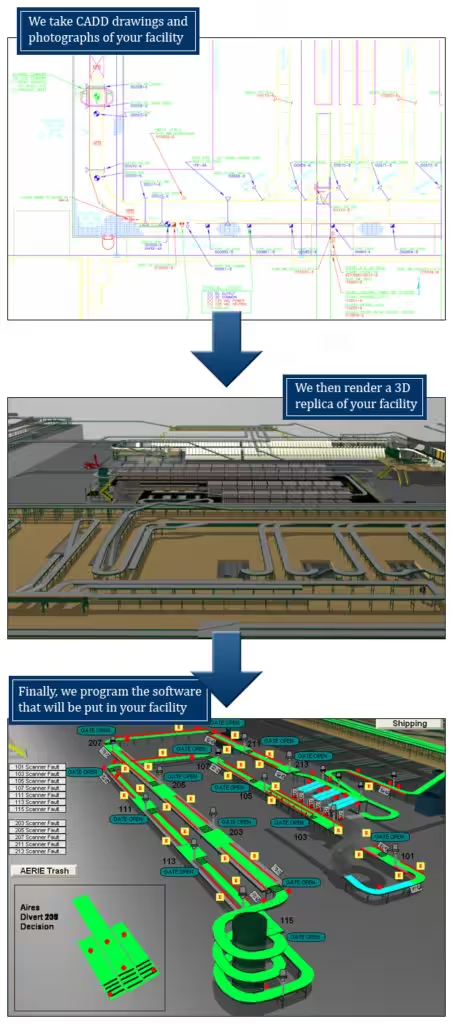
- Line Overview Map: zones, speed, state, alarms, accumulation, and jam pins.
- Device Detail: photo-eyes, I/O states, VFD feedback, fault history, manual jog with interlocks.
- Divert Dashboard: per-lane rates, late/early hits, mis-sorts, and reject loop counts.
- Alarm Summary: filter by severity, zone, time; one-tap to SOP.
- Energy & Idle: MDR sleep/wake counts, VFD utilization.
- Maintenance Planner: counters (starts, hours), lubrication prompts, belt wear notes.
- Training & SOP Library: embedded job aids and LOTO steps.
Data to Expose on HMI (Without Overwhelming)
- Throughput counters (per zone & total), queue length, induct rates
- Scan pass rates and divert accuracy
- Top 10 alarms and repeat offenders
- MTBF/MTTR by device family
Safety by Design
Conveyors include nip points and moving parts. Your HMI must never enable unsafe motion—interlocks and permissives need to be visible and enforced. OSHA’s machine guarding rules (1910.212, 1910.219) are a baseline; reflect them in your screens and procedures. OSHA Machine Guarding Overview. OSHA
Tech Stack Considerations
- PLC languages: Ladder (LD), Function Block (FBD), Structured Text (ST) per IEC 61131-3—standardization simplifies long-term support. Wikipedia
- Historian/Logging: Store alarm/throughput histories for continuous improvement.
- Cybersecurity: User roles, session timeouts, and network segmentation.
Why Choose Lafayette Engineering
LEI’s HMI pages and controls articles emphasize actionable alarms, remote access, and clear status by area—all critical to driving operator effectiveness at scale. That combination of HMI for conveyor systems + controls is how you convert hardware into consistent service levels. LaFayette Engineering+1
External resource: For design guardrails, start with ISA-101: Human-Machine Interfaces. isa.org
If your current HMI feels “busy” or hides the real problem, let’s audit it and redesign for faster fault recovery.