CompactLogix vs. ControlLogix is the controller decision behind most Allen-Bradley conveyor systems: CompactLogix is Rockwell Automation’s compact, rail-mounted controller family for machine-level and mid-sized systems, and ControlLogix is its chassis-based family for large, high-availability systems. Both run the same Logix control engine and the same Studio 5000 Logix Designer software, so the choice comes down to scale, architecture, and what happens to your operation when the controller stops.
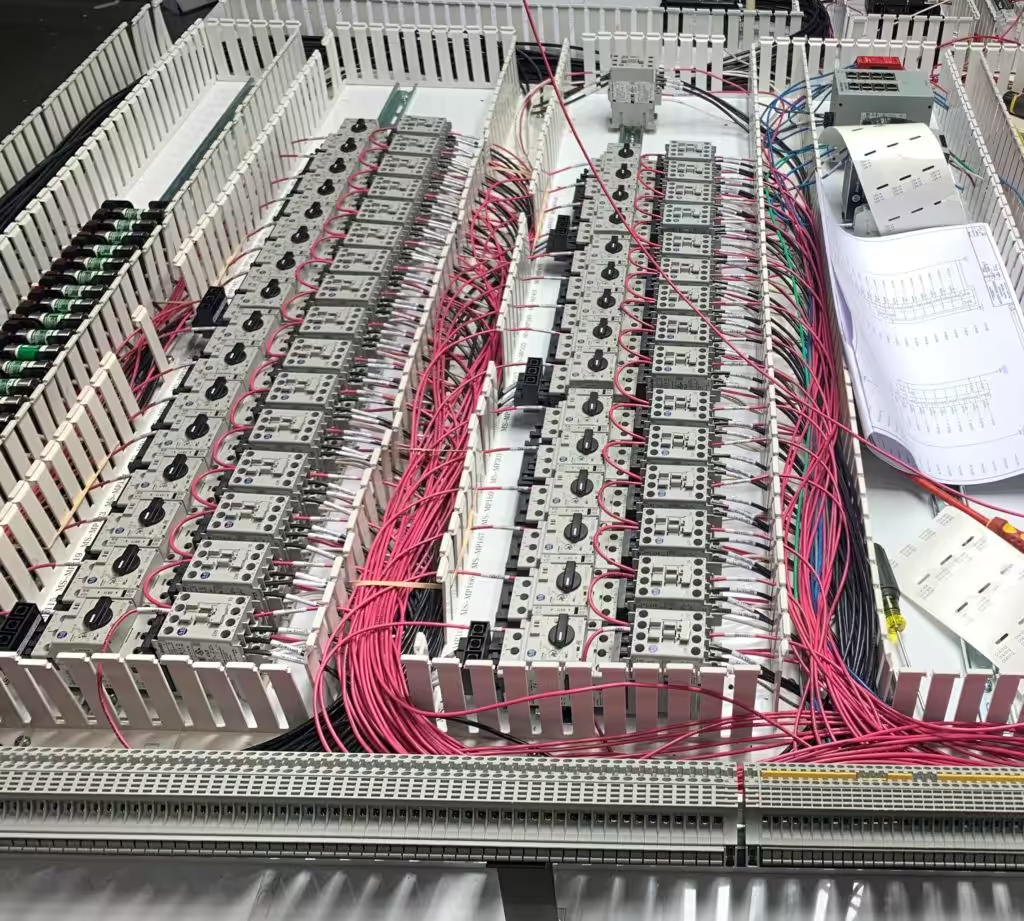
For a distribution center or plant, that choice gets made once and lived with for fifteen years or more. It sets how many controllers your maintenance team supports, which spares sit on the shelf, how a failure affects the building, and what the eventual migration looks like. This guide explains how the two families differ, where each one fits on a conveyor system, and the questions that settle the specification before anyone orders hardware.
At a glance
- CompactLogix and ControlLogix share one programming environment, one instruction set, and the same EtherNet/IP networking. Code and skills carry between them.
- Rockwell positions CompactLogix for small to mid-sized systems and ControlLogix for large, complex, high-availability systems. The real difference is architecture and scale.
- ControlLogix offers controller redundancy, a modular chassis of up to 17 slots, and up to 40 MB of memory on the 5580. CompactLogix 5380 offers up to 10 MB and up to 31 local I/O modules.
- On a conveyor system, the decision usually turns on how much of the building one controller runs, whether a single failure can be tolerated, and how the sorter’s tracking load is split.
- Lifecycle status matters as much as specifications. Know where each family you own sits on Rockwell’s lifecycle before you standardize on it.
Table of Contents
What CompactLogix and ControlLogix Have in Common
The problem: leadership often hears the two names as a budget tier, “small PLC” and “big PLC,” and assumes the cheaper one is a compromise. That framing leads to the wrong conversation.
The engineering answer: the two families are closer than they look. Rockwell’s current controllers in both families use the same re-architected Logix control engine. Both are programmed in Studio 5000 Logix Designer. Both use tag-based programming, Add-On Instructions, and the same ladder, structured text, and function block languages. Both communicate natively over EtherNet/IP, which is how a modern conveyor talks to its drives, I/O blocks, scanners, and HMI.
That shared base has practical consequences for an operation:
- One skill set. A controls technician who can troubleshoot a CompactLogix can troubleshoot a ControlLogix. Training doesn’t split.
- Portable logic. Well-structured conveyor code, such as zone control, merge logic, and photo-eye routines, can be reused between the families with adjustments for I/O and hardware.
- Common integration. The WCS, HMI, and drives connect the same way regardless of which controller sits in the panel.
The useful question is which architecture fits the system you’re building and the risk you’re willing to carry.
Where They Differ: Architecture, Capacity, and Availability
The problem: the spec sheet differences look like numbers on a page until a controller fails, a sorter outgrows its processor, or a project adds a mezzanine the original controller can’t absorb.
The engineering answer: the differences fall into four areas.
Form factor. A CompactLogix 5380 is a self-contained controller that mounts on DIN rail with Compact 5000 I/O modules beside it. Rockwell lists support for up to 31 local Compact 5000 I/O modules. A ControlLogix controller is a module that slides into a 1756 chassis, alongside communication, I/O, and specialty modules. Rockwell offers chassis with up to 17 slots. The chassis is what makes ControlLogix modular: you add capacity by adding modules, and Rockwell lists removal and insertion under power for ControlLogix modules.
Memory and processing. Rockwell lists CompactLogix 5380 memory options from 0.6 to 10 MB. ControlLogix 5580 options run from 3 to 40 MB. More memory doesn’t make a conveyor faster on its own, but it decides how much logic, tracking data, and diagnostics one controller can hold.
Redundancy. ControlLogix supports redundant controllers: a primary and a secondary in separate chassis, with the secondary ready to take over. Rockwell describes the 5580’s redundant capability as using one firmware for standard and redundant systems, with no memory penalty for enabling it. CompactLogix doesn’t offer controller redundancy, and Rockwell’s own comparison names redundancy options as a ControlLogix advantage.
Networking. Both families have a 1 gigabit embedded EtherNet/IP port. CompactLogix 5380 adds dual configurable ports that support two IP addresses or a Device Level Ring. ControlLogix adds network capacity through communication modules in the chassis, and Rockwell’s ControlLogix line supports older networks such as ControlNet, DeviceNet, DH+, and Remote I/O through those modules. That last point matters when a migration has to keep part of an older network running.
| CompactLogix 5380 | ControlLogix 5580 | |
|---|---|---|
| Form factor | DIN-rail controller with local Compact 5000 I/O | Controller module in a 1756 chassis (up to 17 slots) |
| User memory (Rockwell listing) | 0.6 to 10 MB | 3 to 40 MB |
| Controller redundancy | Not offered | Supported |
| Embedded Ethernet | 1 Gb, dual configurable ports | 1 Gb port, plus chassis communication modules |
| Safety version | Compact GuardLogix 5380 (up to SIL 3/PLe) | GuardLogix 5580 (up to SIL 3/PLe with safety partner) |
| Software | Studio 5000 Logix Designer | Studio 5000 Logix Designer |
| Rockwell’s positioning | Small to mid-sized, machine-level systems | Large, complex, high-availability systems |
Specifications change with firmware and catalog numbers. Check the current figures on Rockwell’s CompactLogix 5380 and ControlLogix 5580 pages before a design is finalized.

How Each Family Fits a Conveyor System
The problem: a conveyor system isn’t one machine. It’s receiving, induction, zone conveyor, merges, a sorter, shipping lanes, and sometimes picking and packing, each with different speed, safety, and uptime needs. One controller choice applied to all of it is usually wrong somewhere.
The engineering answer: match the controller to the job each area does.
Zone and transport conveyor. Accumulation zones, transport lines, and spurs are mostly discrete I/O, drives, and photo eyes. A CompactLogix handles this work well. Many operations split the building into areas, each with its own CompactLogix in its own panel, so a fault or a change in one area doesn’t touch the rest.
Merges and induction. Merges gap and meter cartons onto the sorter. The logic is time-sensitive and tightly coupled to the sorter. It can live in an area CompactLogix or in the sorter’s controller, depending on how the system is divided.
High-speed sortation. A sorter tracks every carton by encoder count from induction to its lane and fires the divert at the right moment. The tracking logic runs constantly, and the sorter is usually the one asset the whole building depends on. This is where ControlLogix most often shows up, for its processing headroom, its chassis capacity, and the option of redundancy.
Print and apply, scanning, and WCS interfaces. These add messaging and data traffic: barcode reads, destinations from the WCS, and label data. The controller has to handle that traffic without slowing its scan. Either family can do it, but the load should be counted when the controller is sized.
Safety. Conveyor emergency stops and safety-rated stops can run on a separate safety relay system or on an integrated safety controller. Compact GuardLogix 5380 and GuardLogix 5580 combine standard and safety control in one controller. Rockwell rates Compact GuardLogix 5380 up to SIL 3/PLe with a 1oo2 architecture and GuardLogix 5580 up to SIL 3/PLe with a safety partner. The required performance level comes from the risk assessment, not from the controller catalog.
One Large Controller or Several Smaller Ones?
The problem: the most consequential decision is how much of the building one controller runs. It decides what a single failure takes down.
The engineering answer: there are two common patterns, and both can be right.
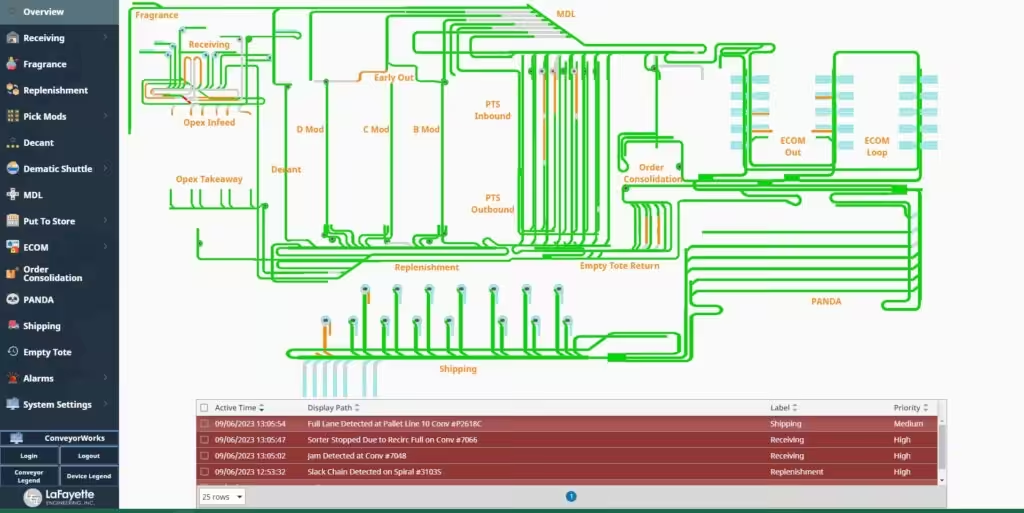
Centralized. One ControlLogix, often with remote I/O spread across the building, runs the whole system or a large share of it. Benefits: one program, one place to look, simple data flow to the WCS, and full visibility across areas. The cost is concentration. If that controller faults and there’s no redundancy, the building stops. That’s the case for redundancy on a centralized design.
Distributed. Several CompactLogix controllers each run an area, such as receiving, the pick module, the sorter induction, and shipping, and share data over EtherNet/IP. Benefits: a fault stays in its area, changes can be tested one area at a time, and each controller is smaller and cheaper to spare. The cost is coordination. Handoffs between areas have to be designed carefully, and there are more programs to keep in version control.
Many large systems blend the two: CompactLogix controllers for the transport and area conveyor, with a ControlLogix on the sorter. What matters is that the split is deliberate, documented, and matched to where downtime costs the most.
7 Questions That Settle the Specification
These are the questions worth asking before anyone picks a catalog number. They keep the decision tied to operations instead of habit.
1. What does one hour of downtime on this controller cost?
If the answer is “the building stops shipping,” the controller deserves redundancy or a design that limits what one failure can take down. If the answer is “one receiving door waits,” a CompactLogix with a spare on the shelf is usually enough.
2. How much of the system does this one controller run?
Count the areas, the drives, the I/O, and the network devices. Every EtherNet/IP device, from VFDs and I/O blocks to scanners and the HMI, uses controller connections and communication bandwidth. Size for the system as built plus planned growth, not for the first phase alone.
3. How heavy is the tracking and messaging load?
Sorter tracking, WCS messaging, and print and apply data add load that a simple conveyor never sees. Ask for the expected scan time and processor utilization at design rate, with margin left over.
4. Will the system grow?
A ControlLogix chassis can take more modules later. A CompactLogix can add local I/O up to its limit, and more areas can get their own controllers. Either path works if growth was planned for. Neither works well if it wasn’t.
5. What does your maintenance team already support?
If the building already runs on one family, standardizing on it keeps spares, skills, and procedures simple. Mixing families is fine, since the software is the same, but every new catalog number is one more spare to stock.
6. Where does each option sit on Rockwell’s lifecycle?
Choose controllers that are current offerings, and know the status of what you already own. More on this below.
7. Who owns the code, and can someone else support it?
The program should be documented, commented, and delivered to the owner. LaFayette Engineering uses only open, non-proprietary components and programming architectures, and its components come from recognized manufacturers so spare parts are available locally. That approach protects the owner whichever family is chosen.

Lifecycle: The Factor That Outlasts the Spec Sheet
The problem: a controller that was the right choice in 2005 can become the reason a line goes down in 2026, because the platform reached end of life and nobody tracked it. The spec sheet tells you what a controller can do. The lifecycle status tells you how long you’ll be able to buy one.
The engineering answer: check status before standardizing, and recheck it every year. Rockwell publishes four lifecycle statuses on its product lifecycle page:
- Active: the most current offering in its category.
- Active Mature: fully supported, but a newer product or family exists.
- End of Life: a discontinued date has been announced. Rockwell’s guidance is to execute migrations and last-time buys.
- Discontinued: no longer manufactured. Repair or exchange services may be available.
Both families have moved forward over the years. On the CompactLogix side, Rockwell names migration paths from the SLC 500 and from older 1768 and 1769 CompactLogix controllers to the current CompactLogix lineup. On the ControlLogix side, the 5580 and the newer ControlLogix 5590 sit alongside older ControlLogix generations. The 5590 adds embedded functional safety, expanded memory, faster scan times, and OPC UA support, and Rockwell states it supports the same I/O as the 5580.
For an operation, the practical step is an inventory: every controller in the building, its catalog number, its firmware, and its current lifecycle status. Anything Active Mature gets a migration plan and a spares check while parts are still easy to buy. Anything End of Life gets a migration date and a last-time buy. LEI’s PLC migration roadmap covers how to sequence that work without stopping production.
Security Features Both Families Now Include
The problem: conveyor controllers now sit on the same networks as the WCS, the WMS, and remote support connections. A controller that anyone on the network can change is a risk to uptime as much as to data.
The engineering answer: use the security features current controllers include, and design the network around them. Rockwell lists these features for the current families:
- CompactLogix 5380: controller-based change detection, logging, encrypted firmware, and role-based access control to routines and Add-On Instructions. CIP Security support is available with Logix Designer version 34 or later.
- ControlLogix 5580: change detection and logging, digitally signed firmware, and role-based access control. Rockwell states the 5580 process controller is certified by TÜV Rheinland to IEC 62443-4-2, part of the ISA/IEC 62443 series for industrial automation security.
Controller features are one layer. Network segmentation, secured remote access, and backups matter at least as much, and older controllers often lack these features entirely. That’s one more reason lifecycle and security planning belong together.
How Migration Shapes the Choice
The problem: most controller decisions aren’t greenfield. They’re about replacing a PLC-5, SLC 500, or early ControlLogix or CompactLogix that’s past its supported life, inside a building that can’t stop for long.
The engineering answer: the migration path often decides the family. Some points to weigh:
- Matching the old architecture. A PLC-5 system with chassis I/O and remote racks maps naturally to ControlLogix. An SLC 500 running one area maps naturally to CompactLogix, and Rockwell names that path directly.
- Keeping old networks during a phased cutover. ControlLogix communication modules can bridge legacy networks while the rest of the system moves to EtherNet/IP. That can let a migration happen area by area instead of all at once.
- Rewriting vs. converting. Code converted line for line from an old platform carries its old structure, and its old workarounds, into the new controller. For a sorter, a clean rewrite of the tracking logic is often worth the time.
- Testing before cutover. Logic should be tested offline, ideally against a simulation of the conveyor, before anyone touches the live system.
How LaFayette Engineering Approaches Controller Selection
LaFayette Engineering designs and installs controls for conveyor systems, including high-speed case sortation. Most of LEI’s work is on Allen-Bradley platforms, so Rockwell’s product families and lifecycle calendar are part of its daily work.
LEI’s published controls process starts with an assessment of the operation’s needs and runs through conveyor concepts, AutoCAD Electrical drawings, in-house panel fabrication, PLC programming including sortation logic, installation, start-up support, and ongoing support. Controller selection happens early in that process, because it shapes the panel layout, the network, the I/O design, and the spares list.
The Pitman Creek project is one published example. The fishing tackle distributor’s new facility in Stanford, Kentucky runs on an Allen-Bradley PLC with SICK cameras, Balluff communication blocks, a Panther print and apply system, and LEI’s ConveyorWorks WCS. LEI’s Pitman Creek success story has the details.
After start-up, LEI’s support team can connect directly to the PLC over a customer’s VPN connection, under warranty, business-hours, or extended 24/7/365 coverage. That’s another reason the controller and its network should be designed together.
If you’re specifying a new conveyor system or replacing an aging controller, LEI’s PLC controls team can help you size the controller to the system and plan for the lifecycle that follows.
This article is general information, not engineering advice. Confirm specifications, ratings, and lifecycle status with the manufacturer for your application.
Frequently Asked Questions
What is the main difference between CompactLogix and ControlLogix?
Scale and architecture. CompactLogix is a compact, DIN-rail controller for small to mid-sized systems. ControlLogix is a chassis-based controller for large, complex systems, with more memory, modular expansion, and controller redundancy. Both use the same Logix engine and Studio 5000 software.
Do CompactLogix and ControlLogix use the same programming software?
Yes. Both are programmed in Studio 5000 Logix Designer, with the same languages, tag-based programming, and Add-On Instructions. A technician who supports one can support the other, and logic can be reused between them with changes for hardware and I/O.
Can CompactLogix run a conveyor sorter?
It can, depending on the sorter’s size, speed, tracking load, and uptime requirements. Smaller sorters and area conveyor run well on CompactLogix. Large, high-rate sorters that the whole building depends on often use ControlLogix for processing headroom and the option of redundancy.
Does CompactLogix support redundancy?
No. Controller redundancy, with a primary and a standby controller, is a ControlLogix feature. A CompactLogix system limits failure impact through design instead: splitting the system into areas, each with its own controller, and keeping spares on hand.
How many I/O modules can a CompactLogix 5380 support?
Rockwell lists support for up to 31 local Compact 5000 I/O modules on the CompactLogix 5380. Additional I/O can be added over EtherNet/IP with remote I/O adapters, within the controller’s connection and communication limits.
What is the ControlLogix 5590?
The ControlLogix 5590 is Rockwell’s newest ControlLogix controller. Rockwell describes it as adding embedded functional safety, expanded memory, faster scan times, and OPC UA support, and states that it supports the same I/O as the ControlLogix 5580.
Should I replace my SLC 500 with CompactLogix or ControlLogix?
Rockwell names a direct migration path from SLC 500 to CompactLogix 5380, and an SLC 500 running one area usually maps well to it. If the old system is part of a larger architecture or needs redundancy, ControlLogix may fit better. Base the decision on the system the new controller will run.
Is CompactLogix cheaper than ControlLogix?
Rockwell describes CompactLogix as the more space- and cost-efficient option for machine-level and smaller systems. Total cost also depends on how many controllers the design needs, the I/O, the spares, and what an outage on that controller costs the operation.