A conveyor spare parts strategy is a deliberate plan for which replacement parts a facility keeps on hand, how many, where they’re stored, and when they get reordered. Its job is simple: when a component fails, the line comes back in the time it takes to swap the part.

Most operations have spare parts. Fewer have a strategy for them. The usual result is a storeroom full of rollers and belts that fail on a schedule everyone can predict, and no spare for the drive, the PLC module, or the scanner whose failure stops the whole building. Conveyor parts that wear out are easy to plan for. The parts that fail without warning, and that can’t be bought overnight, are the ones that decide how long an outage lasts. This guide is written for the managers who own that risk: how to decide what’s critical, how to plan around lead times and lifecycle notices, and how to keep the plan current after start-up.
At a glance
- Spare parts fall into two groups: wear parts that fail predictably, and electrical and controls parts that fail suddenly. The second group causes most long outages.
- Rank every part by what stops when it fails and how long it takes to replace. That ranking sets the stocking level.
- Lead time, not price, is usually what makes a part critical. A cheap module with a long lead time can stop a line for weeks.
- Lifecycle notices change the plan. A product moving to end of life is the signal to make a last-time buy.
- A spare only counts if it’s the right revision, in the right place, and recorded where maintenance will look for it.
Table of Contents
Why Conveyor Spare Parts Need a Strategy
The problem: a conveyor system has thousands of components, and nobody can stock all of them. Without a method, spare parts decisions get made one failure at a time. Whatever broke last gets ordered in pairs, and the parts that have never failed get no attention until they do.
The engineering answer: treat spare parts as a risk decision. Every part in the system carries two numbers that matter: how much of the operation stops when it fails, and how long it takes to get a replacement in hand. Multiply those together and you have the real exposure. A strategy puts the stocking money where that exposure is highest.
This matters most in distribution, where the cost of downtime is set by the calendar. A main line or sorter that’s down during a ship window means missed carrier cutoffs, overtime, and orders that slip a day. The part itself is usually the smallest cost in that outage, which lasts exactly as long as it takes to get the right part to the right panel.
Wear Parts vs. Controls Parts
The problem: the parts that show up on most spare parts lists are the ones maintenance teams replace every month. Those are rarely the ones that cause the long outages.
The engineering answer: split spare parts into two groups and plan for each differently.
| Wear parts | Electrical and controls parts | |
|---|---|---|
| Examples | Rollers, belts, bearings, O-rings, lagging, chain, sprockets | PLC processors and I/O modules, drives, motor starters, power supplies, network switches, photo-eyes, scanners, HMI computers |
| How they fail | Gradually, with warning signs | Often suddenly, with no warning |
| How to plan | Usage history and preventive maintenance | Criticality, lead time, and lifecycle status |
| Typical risk | Frequent, short stops | Rare, long stops |
Wear parts are a consumption problem. Track how many you use, set a reorder point, and keep enough to cover the time between orders. Good preventive maintenance makes that usage predictable. LEI’s guide to warehouse conveyor maintenance covers the inspection side.
Controls spare parts are a different problem. A drive or an I/O module can run for years and then fail in a second. Usage history won’t tell you how many to stock, because you may never have replaced one. What tells you is the consequence of the failure and the time to recover from it. That’s why a controls spare parts list has to come from the system design, not from the purchasing history.
Step 1: Build the Inventory From the Drawings
The problem: you can’t plan spare parts for components you haven’t listed, and most facilities don’t have a current list of what’s installed in each control panel.
The engineering answer: start from the electrical drawings and bills of material. On a well-documented system, every panel has a layout drawing and a bill of material that lists each component by manufacturer and catalog number. That’s the starting inventory. LEI’s controls projects produce AutoCAD Electrical drawings, including panel layouts with a bill of material, for exactly this kind of use after start-up.
For each component, record:
- Manufacturer and catalog number, including the series or revision. A replacement with the right catalog number but the wrong series can need a firmware change before it works.
- Where it’s installed: panel number and area of the system.
- Quantity installed across the whole facility. Ten identical drives on ten lines share one spare pool.
- Firmware version for anything programmable.
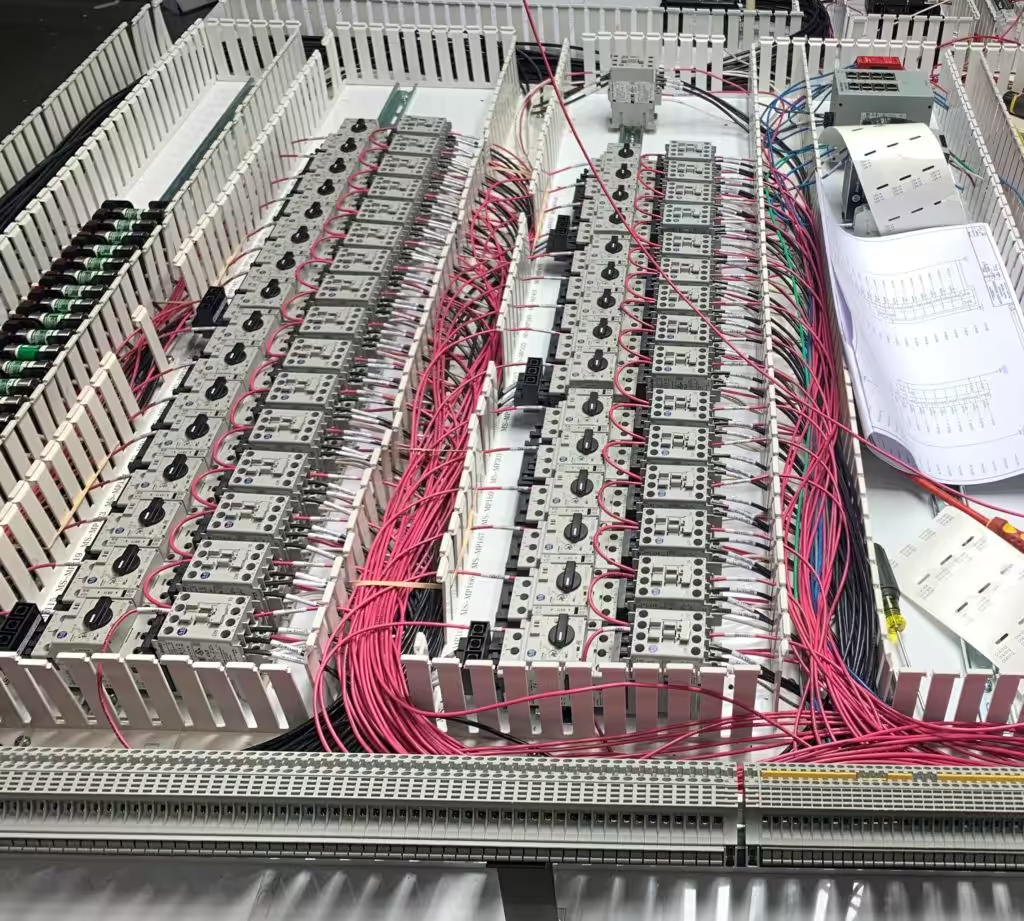
Then walk the panels and check the list against what’s actually there. Components get swapped during repairs, and a drawing that hasn’t been updated since start-up may no longer match the hardware. CISA’s OT asset inventory guidance recommends the same discipline for security reasons, and it goes a step further: it advises owners to analyze the OT spare parts inventory to see whether the spares on hand cover the critical assets in the inventory. One list serves both purposes.
Step 2: Rank Every Part by Criticality
The problem: a spare parts budget is finite. Stocking one of everything wastes money on parts that never matter, while a single missing component can stop the building.
The engineering answer: rank each component by what stops when it fails. A simple three-level scale works for most conveyor systems:
- Critical: failure stops the main line, the sorter, induction, or shipping. Examples include the sorter’s PLC processor, the main line drives, the network switch the controls depend on, the sorter scanner, and the power supply for a control panel.
- Important: failure stops one area, one lane, or one door, and the rest of the building keeps running. Examples include a spur’s motor starter or a single print and apply station.
- Minor: failure has a workaround, such as a photo-eye on a line that can run in a degraded mode for a shift.
Ask the people who run the floor, not only the people who maintain it. Operations knows which lanes can be rerouted and which can’t, and that knowledge changes the ranking. A device that looks minor on a drawing can be critical if it sits at a single point every carton passes through.
Step 3: Plan Around Lead Times
The problem: the price of a part tells you very little about how much it matters. A low-cost I/O module with a long lead time can stop a line for longer than an expensive motor that’s in stock at a local distributor.
The engineering answer: find out the realistic lead time for every critical and important component, and let it set the stocking level. Lead times for controls spare parts vary widely by manufacturer, product, and market conditions, and they change. A practical rule follows from the ranking and the lead time together:
| Short lead time (local stock) | Long or uncertain lead time | |
|---|---|---|
| Critical | Keep at least one on site | Keep at least one on site; consider two for high installed counts |
| Important | Rely on local stock; confirm it exists | Keep one on site |
| Minor | Order on failure | Order on failure, or share with similar parts |
Design choices made years earlier decide how often a part lands in the right-hand column. LEI’s controls practice uses only open, non-proprietary components and programming architectures, with components from recognized manufacturers, so spare parts are available locally. A system built from widely stocked parts has more of its components in the short lead time column, which makes the whole spare parts plan cheaper to carry.
Step 4: Watch Lifecycle Status and Make Last-Time Buys
The problem: a part that’s easy to buy today can become hard to buy within a year. Manufacturers move products through lifecycle stages on their own schedule, and spare parts plans built on today’s availability go stale without anyone noticing.
The engineering answer: add the manufacturer’s lifecycle status to every critical component in the inventory, and recheck it at least once a year. On Allen-Bradley platforms, Rockwell’s product lifecycle status page defines four stages: Active, Active Mature, End of Life, and Discontinued. For End of Life products, Rockwell’s guidance is to actively execute migrations and last-time buys. It also notes that End of Life products are generally orderable until the discontinued date, but outages on specific items may occur before that date.
That makes lifecycle notices a spare parts trigger:
- Active Mature: confirm you hold at least one spare for every critical module. Parts are still easy to buy at normal prices.
- End of Life: make the last-time buy. Size it to the number of installed units, how critical each one is, your failure history, and how long the system must keep running before it’s migrated.
- Discontinued: stock is limited to what’s left, repaired units, and the secondary market. Treat the spares on your shelf as the plan, and get the migration scheduled.
LEI’s article on end of life vs. active mature explains each lifecycle status in more detail and how to plan the migration that eventually replaces the spare parts.
Step 5: Store, Label, and Record Spare Parts So They Can Be Found
The problem: a spare that can’t be found at 2 a.m. doesn’t exist. Neither does one that’s the wrong revision, was borrowed for another job and never replaced, or was stored where heat and dust ruined it.
The engineering answer: manage controls spare parts like the critical inventory they are.
- Keep a single record of every spare: catalog number, series, firmware version, quantity, storage location, and the panels it covers. Put it where the night shift will look.
- Label the shelf and the part. Match the label to the catalog number on the drawings, not an internal nickname.
- Store electronics properly. Keep modules in their original packaging, in a clean, dry, temperature-controlled space.
- Replace what you use. Every time a spare goes into a panel, a replacement order goes out the same day.
- Count the shelf once a year. Check the physical spare parts against the record and fix the differences.
One more item belongs on the shelf for any programmable device: a current backup of its program. A replacement PLC processor arrives empty. If the only copy of the program lives on a laptop that’s also failed, the spare parts plan has a gap that no amount of hardware fills.
Step 6: Plan for the Parts That Need Programming
The problem: many controls spare parts don’t work straight out of the box. A drive needs its parameters, a processor needs its program and firmware, and a network device needs its configuration. In an outage, the time to configure the part can be longer than the time to install it.
The engineering answer: for each programmable spare, plan the recovery steps before the failure.
- Keep current backups of every PLC program, drive parameter set, HMI project, and network configuration, stored in more than one place.
- Record the firmware version each device runs, and make sure spares can be flashed to match.
- Keep the programming software, and a computer that can run it, ready to use. On older systems, that computer may be the only one in the building that can still go online with the controller.
- Know who will do the work. If configuration needs help from the integrator, know how to reach them and what coverage you have.
LEI’s support team can work by phone or connect directly to a PLC over the customer’s VPN, under warranty, business-hours, or extended 24/7/365 coverage. That remote connection is often how a replacement module gets loaded and the line brought back without waiting for a site visit.
Step 7: Review the Plan Every Year
The problem: a spare parts list written at start-up describes the system on day one. Five years later, components have been swapped, lines have been added, some products have gone end of life, and the person who made the list may have moved on.
The engineering answer: schedule a yearly review, ideally well before peak season. Cover four things:
- What changed in the system: new lines, new panels, replaced components, and updated drawings.
- What failed: every failure from the past year, whether a spare was available, and how long the recovery took.
- What changed in the market: lifecycle notices and lead-time changes for every critical component.
- What’s on the shelf: a physical count against the record.
Each review updates the criticality ranking and the stocking levels. It also produces the last-time buy list and the case for any migration project the spares can no longer cover.
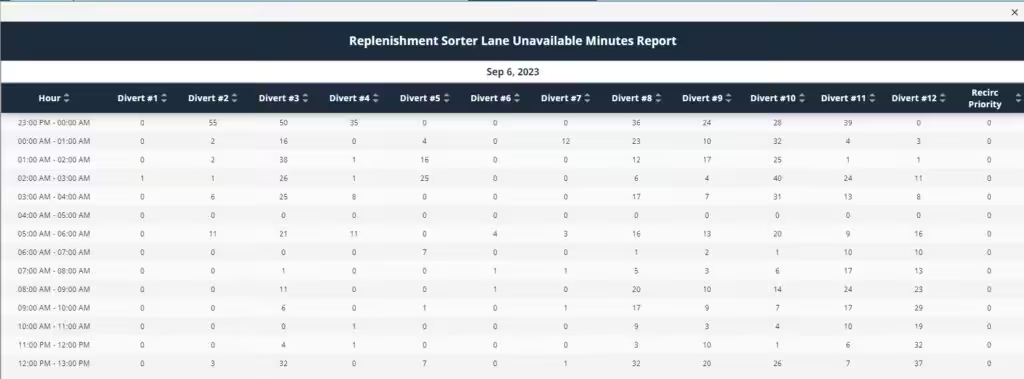
The data for the “what failed” step is often already on the HMI. Alarm histories and lane availability reports show which devices stopped the system, how often, and for how long. That turns the review from memory into evidence.
Common Spare Parts Mistakes
- Stocking only wear parts. Rollers and belts matter, but the long outages usually come from controls spare parts nobody thought to buy.
- Ignoring installed quantity. One spare covers one failure. A facility with dozens of identical drives on its main lines may need more than one.
- Buying the wrong revision. A spare with a different series or firmware can need changes before it works, which costs time in the middle of an outage.
- Losing the list. Recommended spare parts lists get delivered at start-up and then forgotten when the maintenance manager who received them leaves. Keep the list with the drawings, and keep both current.
- Waiting for a failure to justify the budget. The cost of a spare is easy to see. The cost of the outage it prevents is only visible after it happens.
How LaFayette Engineering Supports Spare Parts Planning
LaFayette Engineering designs and installs controls for conveyor systems, including high-speed case sortation, so its view of spare parts starts inside the control panel. The design choices that make spare parts easier to carry are made at the start of a project: open, non-proprietary components and programming architectures, parts from recognized manufacturers that are available locally, and a full set of AutoCAD Electrical drawings with panel layouts and bills of material.
After start-up, customers can request parts through LEI’s online part order request form, which is available 24/7. The form takes the part number, manufacturer, conveyor FO and serial numbers, quantity, and a photo, and lets the customer mark a request as urgent, an RGA, or spare parts. LEI’s team reviews the request and sends a quote.
If you want help building a spare parts plan around the controls in your facility, or finding out which components are approaching end of life, LEI’s PLC controls team can start with your drawings and panels.
This article is general information, not engineering advice. Confirm part numbers, compatibility, and lifecycle status with each manufacturer for your exact equipment.
Frequently Asked Questions
What is a conveyor spare parts strategy?
It’s a plan for which replacement parts a facility keeps on hand, how many, where they’re stored, and when they’re reordered. A good strategy ranks parts by what stops when they fail and how long they take to replace, so the stocking budget goes where the downtime risk is highest.
Which conveyor spare parts are most critical?
Usually the electrical and controls parts on the main line and the sorter: PLC processors and I/O modules, drives, power supplies, network switches, and scanners. They fail without warning, and several have lead times that turn a quick swap into a long outage if no spare is on site.
How do I decide how many spare parts to keep?
Combine three things: how critical the part is, how long it takes to get a replacement, and how many are installed. Critical parts with long or uncertain lead times should have at least one spare on site. High installed counts may justify more than one.
What is a last-time buy?
A last-time buy is a final purchase of spare parts before a manufacturer discontinues a product. It’s sized to keep the installed equipment running until it’s migrated to a supported platform. Rockwell’s lifecycle guidance calls for last-time buys at the End of Life stage.
How is spare parts management different for wear parts and controls parts?
Wear parts like rollers and belts fail gradually, so usage history and preventive maintenance set the stocking level. Controls parts often fail suddenly and may never have been replaced, so the stocking level comes from criticality, lead time, and lifecycle status instead.
How often should a spare parts list be reviewed?
At least once a year, and before peak season. Review what changed in the system, what failed, any lifecycle or lead-time changes for critical components, and a physical count of the shelf against the record.
Do spare PLC modules need to be programmed before use?
Many do. A replacement processor needs its program and the right firmware, and drives need their parameters. Keep current backups of every program and configuration, and make sure the software and a computer that can run it are ready during an outage.
How do I order conveyor parts from LaFayette Engineering?
Use LEI’s online part order request form, which is available 24/7. Include the part number, manufacturer, conveyor FO and serial numbers, quantity, urgency, and a photo if you have one. LEI’s team reviews the request and sends a quote.